


Written together with Sam from Anza.
TL;DR
- Scans across years of transfers, replaying old market conditions, building research datasets and many other workloads need a local copy of Solana's history
- The fastest and most cost-efficient strategy to backfill it is streaming free Old Faithful CAR archives into Superbank's ClickHouse schema with Anza's Jetstreamer
- Old Faithful is Triton's first iteration of public Solana history, storing and serving a verifiable, complete ledger from genesis as one CAR file per epoch
- Jetstreamer streams and decodes the CARs into typed events, and a plugin lands them in your hosted storage
- You can use a custom storage schema or Superbank's, building on top of our performant columnar storage layout, keeping your query patterns fast and cost-efficient
- Together, they give you a complete historical pipeline you control end-to-end: backfilled at over 4M TPS, queryable locally over JSON-RPC (+gTFA), gRPC, or raw SQL
- This post walks you through the full setup, plugin paths, and the best practices for increasing bandwidth and reducing latency
→ Old Faithful: docs and GitHub
→ Superbank: docs and GitHub
→ Jetstreamer: docs and GitHub
When to self-host
Self-hosting trades operational overhead for unmetered queries on your own copy of the ledger. The table below compares it with a managed endpoint so you can choose what fits your workload best:
| Metric | Self-hosting | Managed endpoint |
|---|---|---|
| Monthly costs | Fixed to your hardware | Scales with usage: per-call billing |
| Ops overhead | Provisioning, monitoring, disk, retries, upgrades: yours | Zero; the provider runs everything |
| Setup | Compile with Rust and Clang 16, tune to your needs | Call the endpoint |
| Customisability | Filter ingestion to your programs, reshape the schema, and add your own views | Limited to the provider's defaults and extensions |
| Rate limits | None; your cores and bandwidth set the ceiling | Some, flexible on Triton |
| Query volume | Unmetered; heavy volume is the point | Metered; heavy volume multiplies the bill |
| Accuracy | Verifiable end-to-end: content addressing proves every object, and a fixed range replays identically | Verified by the provider for you |
| Coverage | Complete from genesis, backfilled at your pace | What the provider retains |
| Queries out of the box | Standard history methods plus gTFA from Superbank's schema, and full SQL on your ClickHouse | Your plan's JSON-RPC method set |
| Common use cases | Scanning, replaying, aggregating across wide stretches of history with your own filter logic | Occasional lookups over a narrow window: wallets, agents, most dApps |
The interface is the same on both routes when the provider runs Superbank, so starting managed and moving to self-hosted later is seamless, with no codebase rewrite.
Pipeline explained end-to-end
We'll be using three products in this walkthrough:
Old Faithful. Triton's public-good archive of the complete Solana ledger: every block and transaction from genesis, packed into one CAR (Content Addressable aRchive) file per epoch, served for free from a CDN at files.old-faithful.net.
Jetstreamer. Anza's replay engine for those files: a Rust workspace you compile and run on your own server that streams them in, decodes them into typed events in memory, and calls your plugin's hooks for each one.
Superbank. Our ground-up rebuild of the ledger, designed for faster and easier historical access. Four pieces ship in a single open-source workspace: predefined ClickHouse schemas, an ingestor, a JSON-RPC server that covers the standard history methods plus gTFA, and the ready-made Jetstreamer plugin used in this guide.
Here's how they work together:
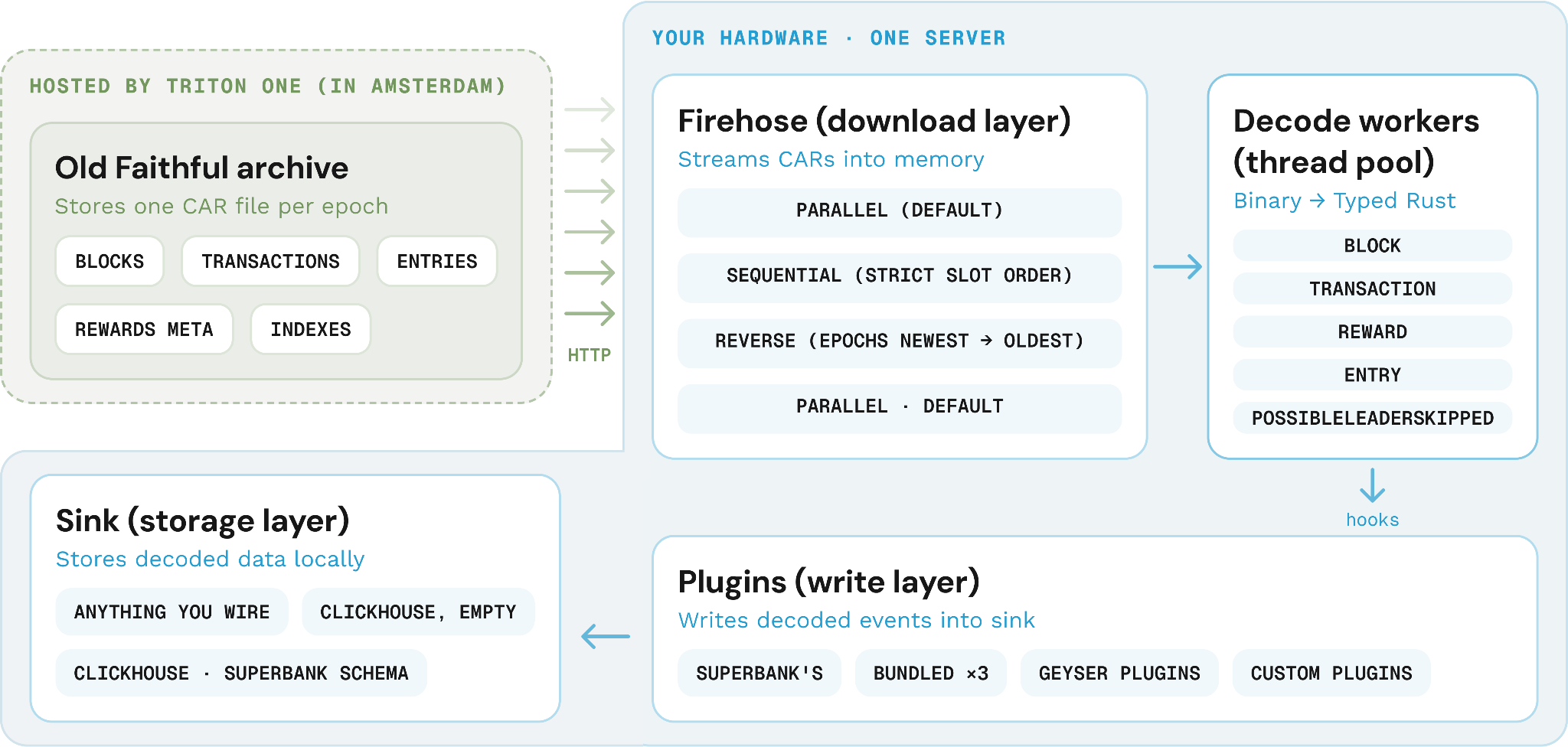
Jetstreamer's firehose is designed to bypass CDN bandwidth per-connection limits (~100 Mbit on Cloudflare) and maximise your downlink throughput by opening many parallel HTTP range requests against the same CAR file, each fetching a different slice.
Those slices land at Jetstreamer's decode workers, a pool of threads that parse the binary records inside the CAR files into typed Rust events:
- Parallel mode (default) gives each worker its own slice of the slot range to decode concurrently: nothing waits to be reassembled, but your storage receives events out of slot order. Maximum TPS scales with available CPU cores and network bandwidth - on a 96-core instance with locally-hosted CARs (bypassing CDN per-connection limits), we've reached 4M TPS.
- Sequential mode stitches parallel downloads back into a single ordered stream using a double buffer: one buffer is read start to finish while the next fills, swapping when the reader catches up. There's a short wait while the first one fills; afterwards, the stream is continuous, but at a much lower ceiling (~180k TPS).
Decoding produces four kinds of events: blocks, transactions, entries, and rewards, each carrying runtime status metadata, signatures, account keys, instructions, balance changes, and log messages. Skipped slots also arrive through the block event: on_block receives a BlockData::PossibleLeaderSkipped variant, which you detect with block.was_skipped().
These events then call the plugin through its matching hooks (on_block, on_transaction, on_reward, on_entry) to write to the storage you chose. If you use one of the bundled plugins (program-tracking, instruction-tracking, pubkey-stats), an empty ClickHouse instance is spawned for you by default.
In this guide, we'll also be showing you how to use Superbank's plugin: it writes into a DDL-schemed ClickHouse with three base tables (transactions, blocks_metadata, entries) and three insert-time materialised views (gsfa, signatures, token_owner_activity), ready to serve the standard history methods and gTFA out of the box.
If you need your own filtering, decoding, or schema, you can build your own plugin on Jetstreamer's Plugin trait or run an existing Geyser plugin through firehose_geyser().
Old Faithful's limitations
Old Faithful archive stores blocks, transactions, entries, and reward metadata, with each transaction stored in its already-executed state, exactly as Geyser first saw it.
Because the files are packed by epoch and ordered by slot, nothing in the archive maps an account to its transactions, which leaves two gaps to plan around:
- No single-token scoping. To work around it, stream a slot range and filter by account key inside your plugin, sizing the range to the token's actual lifetime.
- No account updates. If you need the historical account state, you can reconstruct it from transaction effects (log messages and balance changes).
Step-by-step walkthrough
We'll backfill a single epoch of Solana history, with three paths to choose from depending on what you're after:
- Path A (recommended for most teams). Stand up Superbank with its ready-to-go Jetstreamer plugin when you're powering a consumer app, DEX, wallet, explorer, or portfolio tracker that needs fast block / transaction history.
- Path B. When you need aggregate network metrics, run one of Jetstreamer's bundled plugins:
- program-tracking: how heavily each program is used, with vote traffic separated from real activity, for protocol-usage and adoption analytics.
- instruction-tracking: per-slot instruction and transaction counts, split vote versus non-vote, for tracking network load and throughput over time.
- pubkey-stats: per-slot account-mention counts, for surfacing the hottest accounts (like the USDC mint).
- Path C. To index a single program into your own data model, feed a dashboard or research pipeline shaped your way, or land history in Postgres or Parquet instead of ClickHouse, build your own plugin or run an existing Geyser plugin straight off the archive.
Step 0: prerequisites
Hardware. Jetstreamer runs on any commodity x86-64 Linux server or Apple Silicon Mac. Throughput scales with cores and bandwidth. Two verified reference points:
- 1 Gbit uplink, any modern server → sequential mode at ~180,000 TPS
- 64 cores + 100 Gbps → parallel mode at ~2.7M TPS with 255 threads (up to 4M TPS on 96 cores with locally-hosted CARs)
For hardware in between, binary-search for the right thread count - covered in "Tune threads to your hardware".
RAM. The sequential download double-buffer uses min(4 GiB, 15% of available RAM). 16 GiB or more gives comfortable headroom.
Network. The archive CDN (files.old-faithful.net) is hosted in Amsterdam. Running your ingest server in the EU or on a host with a high-bandwidth uplink directly reduces per-epoch download time.
Rust. Install the stable toolchain via rustup.rs.
Clang 16. Required specifically for the RocksDB build dependency - newer Clang versions may not work.
# Ubuntu / Debian
wget -qO- https://apt.llvm.org/llvm.sh | sudo bash -s -- 16
sudo apt update && sudo apt install -y gcc-13 g++-13 zlib1g-dev libssl-dev libtool
export CC=clang-16
export CXX=clang++-16
export LIBCLANG_PATH=/usr/lib/llvm16/lib/libclang.so
# macOS (Homebrew)
brew install llvm@16 zlib openssl libtool
export CC=$(brew --prefix llvm@16)/bin/clang
export CXX=$(brew --prefix llvm@16)/bin/clang++
export LIBCLANG_PATH=$(brew --prefix llvm@16)/lib/libclang.dylib
export LDFLAGS="-L$(brew --prefix llvm@16)/lib"
export CPPFLAGS="-I$(brew --prefix llvm@16)/include"Crucial: LIBCLANG_PATH must be active. Omitting it causes the librocksdb-sys compilation to crash. These configuration steps are based on the Jetstreamer README, where you can also find specific instructions for Arch Linux.
Step 1: compile the workspace
Set up the compiler before running cargo build. The CC/CXX/LIBCLANG_PATH exports from Step 0 must be active in the same shell session.
Path A - Superbank backfill. The Superbank repo ships Jetstreamer as a git submodule inside ingest/. Build both together:
git clone --recurse-submodules https://github.com/solana-rpc/superbank.git
cd superbank

# Ingestor (live tip) and RPC server
cd ingest/jetstreamer-clickhouse-plugin
cargo build --release
cd ../..
Paths B and C - bundled or custom plugins. Clone standalone Jetstreamer:
git clone https://github.com/anza-xyz/jetstreamer.git
cd jetstreamer
cargo build --release
This produces a single ./target/release/jetstreamer runner binary - the bundled plugins are compiled into it and selected at runtime with --with-plugin - plus the cargo clickhouse-client / cargo clickhouse-server aliases used in Path B.
Clang 16 must be on $PATH before cargo build runs. If you see errors mentioning librocksdb, clang, or cc1, the compiler is missing or wrong - re-export CC, CXX, and LIBCLANG_PATH from Step 0 before re-running. A missing LIBCLANG_PATH is the most common cause of librocksdb-sys build failures.
Step 2: choose an execution mode
Decide before you launch. The mode is set once at startup, either as a CLI flag on the runner invocation or as an env var, and applies to the entire run.
| Mode | Flag | Order | Best for |
|---|---|---|---|
| Parallel | default | many subranges at once, out of order downstream | maximum throughput, metrics, aggregation |
| Sequential | --sequential | strict slot order, first to last | storage that needs ordered writes |
| Reverse | --reverse | epochs newest to oldest; slots still ascend within each epoch | data research, validating recent history first, walking backward from the tip |
Step 3 / Path A: backfill Superbank
Step A1: stand up ClickHouse and apply Superbank's schemas
Start ClickHouse with Docker (from the superbank/ root). This creates three base tables (transactions, blocks_metadata, entries) and three materialised views (gsfa, signatures, token_owner_activity). If you want to filter which addresses land in the views, customise the DDL before this step.
docker run -d \
  --name superbank-clickhouse \
  -p 8123:8123 \
  -p 9000:9000 \
  --ulimit nofile=262144:262144 \
  -e CLICKHOUSE_DB=default \
  -e CLICKHOUSE_USER=default \
  -e CLICKHOUSE_PASSWORD="" \
  -e CLICKHOUSE_SKIP_USER_SETUP=1 \
  clickhouse/clickhouse-server:26.1.2.11

# Verify it's up
curl -s http://localhost:8123/ping
# → Ok.

# Apply Superbank's DDL:
# Base tables
cat ddl/local/transactions.sql    | docker exec -i superbank-clickhouse clickhouse-client --multiquery
cat ddl/local/blocks_metadata.sql | docker exec -i superbank-clickhouse clickhouse-client --multiquery
cat ddl/local/entries.sql         | docker exec -i superbank-clickhouse clickhouse-client --multiquery

# Materialised views - computed by ClickHouse at insert time, not by the plugin
cat ddl/local/gsfa.sql                 | docker exec -i superbank-clickhouse clickhouse-client --multiquery
cat ddl/local/signatures.sql           | docker exec -i superbank-clickhouse clickhouse-client --multiquery
cat ddl/local/token_owner_activity.sql | docker exec -i superbank-clickhouse clickhouse-client --multiquery
Step A2: backfill an epoch range with the Jetstreamer plugin
Run the backfill orchestrator from the superbank/ root:
# Single epoch (epoch 800 = slots 345,600,000-346,031,999)
./ingest/run_batch.sh 800
# Inclusive epoch range, ascending
./ingest/run_batch.sh 157-800
# Descending - newest epoch first (useful to validate recent data before committing to a full backfill)
./ingest/run_batch.sh 800-157
run_batch.sh builds jetstreamer-clickhouse automatically on first run, then orchestrates per-epoch ingestion, routing each epoch to the correct ClickHouse shard. You can also invoke a single epoch directly:
JETSTREAMER_CLICKHOUSE_DSN=http://localhost:8123 \
  ./ingest/jetstreamer-clickhouse-plugin/target/release/jetstreamer-clickhouse 800
Key environment variables (all optional, defaults shown):
| Variable | Default | What it does |
|---|---|---|
JETSTREAMER_CLICKHOUSE_DSN | http://localhost:8123 | ClickHouse endpoint |
JETSTREAMER_THREADS | Hardware auto-detected (CPU + network heuristic) | Worker thread count |
JETSTREAMER_CLICKHOUSE_FLUSH_MAX_ROWS | 100000 | Row threshold per flush |
JETSTREAMER_CLICKHOUSE_FLUSH_INTERVAL_MS | 10000 | Time-based flush interval (ms) |
For thread-count tuning, see Tune threads to your hardware.
Step A3: serve the standard history methods + gTFA
CLICKHOUSE_URL=http://localhost:8123 \
CLICKHOUSE_DATABASE=default \
CLICKHOUSE_USER=default \
CLICKHOUSE_PASSWORD="" \
CLICKHOUSE_GSFA_TABLE=default.gsfa \
CLICKHOUSE_SIGNATURE_STATUSES_TABLE=default.signatures \
CLICKHOUSE_TOKEN_OWNER_ACTIVITY_TABLE=default.token_owner_activity \
CLICKHOUSE_TRANSACTION_TABLE=default.transactions \
CLICKHOUSE_BLOCKS_METADATA_TABLE=default.blocks_metadata \
./target/release/superbank-rpc
Smoke-test it:
curl -s http://localhost:8899 \
  -X POST -H "Content-Type: application/json" \
  -d '{"jsonrpc":"2.0","id":1,"method":"getFirstAvailableBlock"}' | jq .

# → {"jsonrpc":"2.0","result":345600000,"id":1}
Your Superbank instance now serves getSignaturesForAddress, getTransaction, getBlock, getTransactionsForAddress, and all standard history methods at :8899.
For live ingestion from the current tip, connect the Superbank ingestor to Dragon's Mouth or Fumarole.
Step 3 / Path B: run a bundled plugin
Step B1: invoke the runner over an epoch or slot range
From the jetstreamer/ directory:
# Default - program-tracking plugin (used when no --with-plugin flag is set)
./target/release/jetstreamer 800

# Per-slot instruction and transaction counts (vote vs non-vote)
./target/release/jetstreamer 800 --with-plugin instruction-tracking

# Hottest pubkeys by mention count
./target/release/jetstreamer 800 --with-plugin pubkey-stats

# Slot range in sequential mode (strict order)
./target/release/jetstreamer 358560000:367631999 --with-plugin program-tracking --sequential
Bundled plugins: program-tracking (default when none specified), instruction-tracking, pubkey-stats.
The embedded ClickHouse starts automatically; no separate setup is needed. Each plugin creates its tables on first run if they don't exist.
Step B2: develop schema for the embedded ClickHouse
The bundled ClickHouse arrives empty. Each plugin creates its own tables on first run - no manual DDL needed. If you'd rather not manage schema at all, that's exactly what Path A removes.
| Plugin | Tables created | What's stored |
|---|---|---|
| program-tracking | program_invocations | Per-slot program invocations with vote flag, count, error count, and compute units |
| instruction-tracking | slot_instructions | Per-slot vote and non-vote instruction and transaction counts |
| pubkey-stats | pubkey_mentions, pubkeys + materialised view | Per-slot account-mention counts with a deduplication lookup |
Addresses are stored as raw 32-byte FixedString(32), not base58. Use base58Encode() in queries and base58Decode() in WHERE filters.
Step B3: query the ClickHouse
Open an interactive SQL session against the embedded ClickHouse from within jetstreamer/:
cargo clickhouse-clientExample queries:
-- Programs ranked by total error count (from the bundled query.sql)
SELECT
    base58Encode(program_id)          AS program,
    sum(count)                        AS total_invocations,
    sum(error_count)                  AS total_errors,
    sum(total_cus) / sum(count)       AS avg_cus
FROM program_invocations
GROUP BY program_id
ORDER BY total_errors DESC
LIMIT 25;

-- Per-slot vote vs non-vote activity
SELECT slot, vote_transaction_count, non_vote_transaction_count
FROM slot_instructions
ORDER BY slot
LIMIT 100;

-- Hottest accounts by mention count
SELECT base58Encode(pubkey) AS address, sum(num_mentions) AS total_mentions
FROM pubkey_mentions
GROUP BY pubkey
ORDER BY total_mentions DESC
LIMIT 20;

-- All slots where the Token program appears
SELECT slot, num_mentions
FROM pubkey_mentions
WHERE pubkey = base58Decode('TokenkegQfeZyiNwAJbNbGKPFXCWuBvf9Ss623VQ5DA')
ORDER BY slot;
Step 3 / Path C: build a custom plugin or run your existing Geyser plugin
Step C1: implement the Plugin trait
Create a new Cargo binary project and add the required dependencies:
cargo new my-indexer --bin
cd my-indexer
# Cargo.toml
[dependencies]
jetstreamer = "0.6"
clickhouse = "0.14" # optional - only if you want to write to ClickHouse yourself
futures = "0.3"Pin clickhouse to the same version Jetstreamer uses - 0.14 for v0.6.0. Plugin hooks receive an Arc<clickhouse::Client>, so a version mismatch is a compile error. Jetstreamer's main has already moved to 0.15; check its Cargo.toml when a new release lands.
Implement the Plugin trait. Every hook method has a no-op default implementation - override only the ones your indexer needs. The snippet below is verified against Jetstreamer v0.6.0:
use jetstreamer::{
    firehose::{epochs, BlockData, TransactionData},
    plugin::{Plugin, PluginFuture},
    JetstreamerRunner,
};
use std::sync::Arc;
use clickhouse::Client;

struct MyIndexer;

impl Plugin for MyIndexer {
    fn name(&self) -> &'static str { "my-indexer" }

    fn on_transaction<'a>(
        &'a self,
        _thread_id: usize,
        _db: Option<Arc<Client>>,
        tx: &'a TransactionData,
    ) -> PluginFuture<'a> {
        Box::pin(async move {
            // filter, accumulate, write to your store
            println!("sig={}", tx.signature);
            Ok::<(), Box<dyn std::error::Error + Send + Sync + 'static>>(())
        })
    }

    fn on_block<'a>(
        &'a self,
        _thread_id: usize,
        _db: Option<Arc<Client>>,
        block: &'a BlockData,
    ) -> PluginFuture<'a> {
        Box::pin(async move {
            // flush your accumulated batch to the sink once the block completes
            println!("block slot={}", block.slot());
            Ok::<(), Box<dyn std::error::Error + Send + Sync + 'static>>(())
        })
    }
}

fn main() {
    let (start_slot, end_inclusive) = epochs::epoch_to_slot_range(800);

    JetstreamerRunner::new()
        .with_plugin(Box::new(MyIndexer))
        .with_threads(4)
        .with_slot_range_bounds(start_slot, end_inclusive + 1)
        .run()
        .expect("runner completed");
}
The full Plugin trait also exposes on_reward, on_entry, on_error, on_load, and on_exit - add them the same way.
Global state, not per-thread. The async runtime spawns and retires worker threads during the run. State in a thread-local will be silently dropped when that thread is retired. Use global state instead - an Arc<Mutex<T>>, a DashMap, or atomics. Accumulate per slot and flush in on_block.
Step C2: configure and launch JetstreamerRunner
The JetstreamerRunner builder allows you to configure the runtime environment programmatically:
| Builder method | Equivalent env var / flag | Default |
|---|---|---|
.with_threads(n) | JETSTREAMER_THREADS | hardware auto-detected (CPU + network heuristic) |
.with_slot_range_bounds(start, end) | positional arg | - |
.with_sequential(true) | --sequential / JETSTREAMER_SEQUENTIAL | false |
.with_reverse(true) | --reverse / JETSTREAMER_REVERSE | false |
.with_clickhouse_dsn(url) | JETSTREAMER_CLICKHOUSE_DSN | http://localhost:8123 |
.with_buffer_window_bytes(bytes) | --buffer-window / JETSTREAMER_BUFFER_WINDOW | min(4 GiB, 15% RAM) |
Build your indexer and launch it with the desired thread count:
cargo build --release
JETSTREAMER_THREADS=8 ./target/release/my-indexer
Step C3: route output to your sink of choice
- ClickHouse: Use .with_clickhouse_dsn(url) to inject a pre-connected Arc<Client> into your hooks.
- Postgres / Kafka: Initialize your connection in on_load, store it in a global Arc, and use it within on_transaction.
- Geyser Plugins: Wrap existing plugins using the firehose_geyser() compatibility layer.
For the production-grade plugin structure (global DashMap, per-slot accumulation, batched flush on block), read through the bundled program_tracking plugin source in jetstreamer-plugin/src/plugins/program_tracking.rs - it was optimised by the Anza team specifically for this workload and is the canonical reference implementation.
What to watch out for in production
Tune threads to your hardware
The default network capacity is 1 Gbit (JETSTREAMER_NETWORK_CAPACITY_MB=1000). The default thread count is auto-detected from a CPU + network heuristic - capped by both core count and the configured bandwidth - so at 1 Gbit it resolves to just a few threads, and the bottleneck is purely the downlink.
Above ~12-15 Gbps, the bottleneck shifts from bandwidth to CPU compute - specifically the dynamic memory allocation involved in rebuilding the transaction status meta type, which fans out into many heap-allocated fields per transaction. A 30 Gbps link behind a 4-core server will sit half-idle at that point.
To find the sweet spot for your hardware, set JETSTREAMER_THREADS and binary-search: start at the default, double a few times, and keep climbing until throughput stops rising. Erring high is cheap - the fall-off beyond the optimum is ~1,000 TPS per extra thread, negligible against millions.
As an anchor, a 64-core box over a 100 Gbps link peaks at ~255 threads. On a 96-core instance with locally-hosted CARs (bypassing Cloudflare's ~100 Mbit per-connection limit), throughput reaches 4M TPS.
Fun fact: for sequential decoding, ARM MacBooks run this workload roughly twice as fast as the fastest x86 Linux servers, thanks to how their cache behaves.
Keep the accumulation state global
Per-thread accumulation looks ideal and works most of the time, but can cause lost data at higher thread counts, as the async runtime spawns and retires worker threads underneath.
Keep any in-memory accumulation in the global state to preserve the progress at all times. The bundled plugins do this with a shared DashMap and atomics, and that's the pattern you should copy when writing your own plugin.
Batch your writes
While writing every transaction to the database might be the obvious approach, with hundreds of concurrent threads, it buries your sink in tiny writes.
Accumulate in memory and flush in batches instead. The recommended cadence is per completed slot - accumulate events in on_transaction, then flush the batch in on_block when the block event arrives. The bundled plugins and Superbank's ingest plugin both follow this pattern: gather per-slot rows into a shared DashMap, then batch-insert on each block event.
For very high-throughput sinks, you can also batch across ~100 slots, which is the interval the PluginRunner uses internally for its own ClickHouse progress tracking writes.
Match that shape to ensure your sink stays responsive at full throughput.
Plan with out-of-order writes
In parallel mode, different threads handle different subranges at once, so your sink sees writes in arbitrary order even though each thread is internally sequential. Design for out-of-order from the start, or run sequential mode if the order matters.
Lean on the built-in stats
The firehose already tracks its own progress with atomics: slots processed, plus overall and per-thread throughput. Your code gets the same numbers via StatsTracking, whose on_stats handler fires at the slot interval you set.
The accounting is designed to stay out of the hot path, so you can skip hand-rolled transaction counters.
Check epoch availability
Depending on which plugin you run, older epochs may not carry compatible metadata. Two boundaries matter most.
| Epochs | What to know |
|---|---|
| 0 to 156 | Not compatible with the Geyser plugin interface; works only with Jetstreamer's firehose and runner |
| 157 and up | Compatible with the Geyser plugin interface |
| 0 to 449 | Compute units not tracked, reported as 0 |
| 450 and up | Compute unit accounting available |
Forward from the tip
When a run finishes, you have a backfilled, self-owned index of Solana history, built on your own hardware against a free public archive, with no per-query credits and no rate limits.
To keep indexing forward from the tip, pair this with Fumarole, a persistent, high-availability gRPC stream of live Geyser events with at-least-once delivery and subscribers that resume cleanly after a reconnect.
Final words
Indexing history isn't a finished task. Old Faithful was Triton's first iteration of public Solana history, and it inspired what came next: Superbank, the ground-up rebuild of the historical ledger for RPC 2.0, and Anza's Horizon, a next-generation history dataset that adds the missing account updates and packs the data far tighter thanks to its compression and encoding work.
We couldn't be more excited about Horizon's release and the account-level use cases it will unlock.
Until then, this pipeline is the best method to date, and the free, public-good way to own Solana history end-to-end.